Online Quantitative EEG Analysis
From the lab to the desktop, turn your EEG recordings into readable metrics for education and research. Free, open, and entirely in your browser — no complex or expensive software to install.
1 — Upload
Select a case folder or a single file from your EEG monitor (compatible with Masimo SedLine and BIS Vista).
2 — Analyze
Fully automated — no changes needed. You can still choose the channel and the time window.
3 — Visualize
Review at your own pace, compare cases, and build your own dataset.
What do you get?
A dashboard report that summarizes a full analysis of the EEG signal — downloadable, so you can build your own archive, patient reports, and data analyses.
Learn how to extract data from EEG monitors, read the instructions, and watch the videos.
How an EEG becomes a number
A recording of the brain under anesthesia is just a faint, noisy voltage. Getting from that to a trustworthy metric takes a few careful steps — here is the whole path, in plain terms.
Purpose and scope
NeuralMetricWeb aims to deepen the understanding of the neurophysiological dynamics induced by anesthetic agents, whether inhaled or intravenous (TIVA). It does not replace the clinical judgment of the anesthesiologist; it complements EEG analysis, integrating clinical findings with quantitative data that often go unnoticed in standard monitoring.
Learn how to extract data from EEG monitors, read the instructions, and watch the videos.
Using the app, step by step
From opening the app to reading your results. Each step shows what you'll actually see on screen — nothing is uploaded anywhere, so you can try it on a real case safely.
Before you start: getting the data off your monitor
Step-by-step instructions for recording EDF on the Masimo SedLine and exporting from the BIS Vista (PDF, in Spanish).
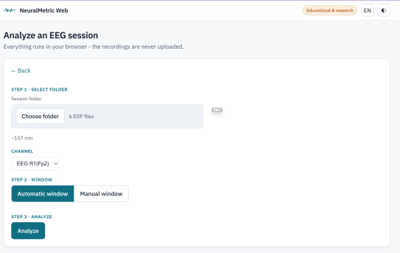
Three steps, one button each
Press Choose folder to load the session's EDF files and pick the EEG channel. Then choose how the analyzed area is set: Automatic window finds it for you, while Manual window lets you mark the start and end of the segment yourself. Press Analyze and your results appear.
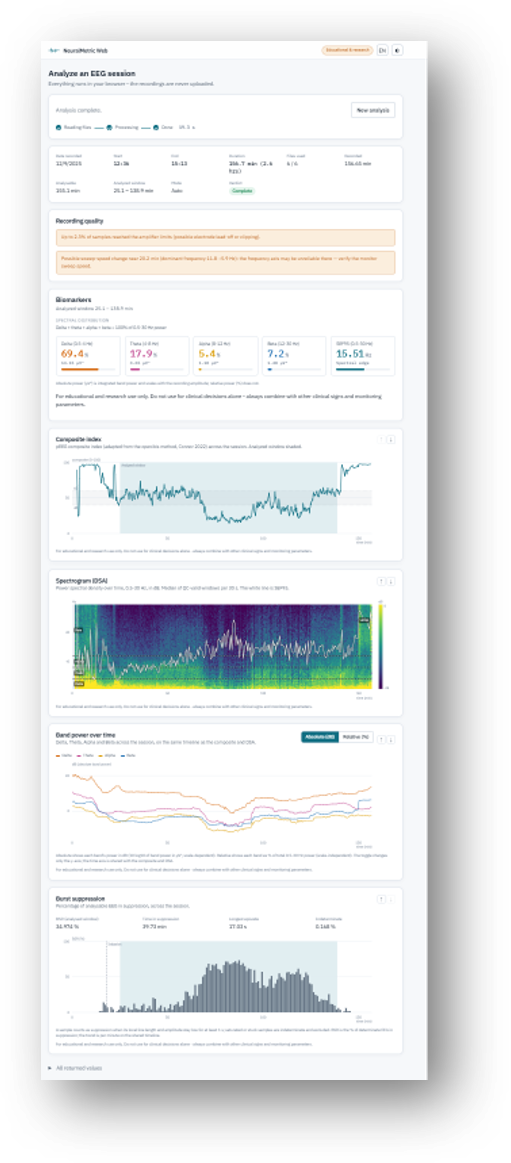
What the results panel shows
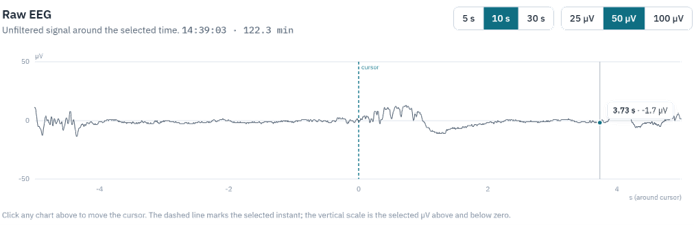
Select a window and view the raw EEG
Click anywhere on a chart to display the raw EEG trace for that time segment. The default window is 10 seconds, but you can choose 5 or 30 seconds, and set the amplitude scale to 25, 50, or 100 µV.
Watch: loading a case and reading the results
Export your data and manage your dataset any time
Notice: You are responsible for any patient data in exported files — de-identify before saving or sharing, and comply with your institution's policies and applicable privacy and research-ethics regulations.
Learn how to extract data from EEG monitors, read the instructions, and watch the videos.
About the author and the project

Erick Dunkley
Award-winning research
First Prize, XXVII International Congress on Medical Advances (Guadalajara, México, 2026).
"Electroencephalographic Biomarkers of Anesthetic Depth: Quantitative Analysis of Burst Suppression and Alpha Power in Two Clinical Cases."
Co-investigators: Dr. José Andrés Olvera Grez; Dr. Luis Alberto Zuñiga Carmona.
Research focus
Quantitative EEG analysis for retrospective and real-time anesthesia-depth monitoring; burst-suppression patterns and alpha-power dynamics during general anesthesia; and the clinical application of objective neurophysiological markers for optimized anesthetic management and improved patient outcomes.
NeuralMetricWeb is a tool for the retrospective analysis of electroencephalographic biomarkers in perioperative and clinical research. It brings together quantitative parameters, spectral biomarkers, and visualization tools for a more orderly, practical, and reproducible evaluation of the EEG signal.
It is part of an effort to strengthen brain monitoring and help identify neurophysiological patterns with potential clinical value — opening opportunities for research on anesthesia depth, burst suppression, postoperative delirium, and neurological recovery.
This web app is not a certified medical device for automated diagnosis. Its results, metrics (BSR, SEF95, absolute and relative power) and visualizations (PSD, DSA, BSR) should be interpreted only by a qualified professional (anesthesiologist or neurophysiologist). It complements — but never replaces — clinical judgment, direct patient observation, and standard monitoring. The brain is an evolving field of study: the parameters shown are based on current scientific literature and require continuous clinical validation as new evidence appears.
Limitation of liability
The developer is not responsible for clinical decisions made, nor for surgical or postoperative outcomes derived from the use of this tool. The user assumes full responsibility for data loading, threshold configuration, and interpretation of the generated reports.
Learn more about the methodology used for data extraction, cleaning, and analysis.
Methods guide (PDF)Learn how to extract data from EEG monitors, read the instructions, and watch the videos.